


Let’s be honest: most virtual office party games lists are stuffed with ideas that sound great until you’re actually on the call and everyone’s camera is off and nobody knows whose turn it is.
I’ve been there — staring at a grid of tiny faces wondering if anyone is having fun (spoiler: they were not). So this list of virtual office party games is built differently.
Every single one has been chosen because it genuinely works over a video call — whether that means screen-sharing a trivia deck, holding a printed bingo card up to the camera, or typing answers into the chat so even the quieter folks can play.
No fancy apps required, no awkward silences, and absolutely zero icebreakers that involve going around the room and sharing your ‘fun fact’ in alphabetical order.
I’ve organized these 20 games in a rhythm that flows naturally through your party: a few crowd-pleasers to kick things off, some active games to get energy up, a whole stack of printable sheets your team can download before the call (hello, engagement insurance!), and a couple of warm, low-key moments to land the whole thing beautifully.
Whether you’re planning a team end-of-year celebration, a virtual happy hour, or just a midweek morale boost, this lineup has you covered.
Grab a snack — and maybe set up a cozy coffee corner at your desk — because this is going to be a good one.
This post contains affiliate links — if you buy through them, I may earn a small commission at no extra cost to you.
- Virtual Trivia (Screen Share)
- Guess Whose Desk
- Two Truths and a Lie
- Online Scavenger Hunt
- Emoji Story Challenge
- Guess the Baby Photo
- Categories Speed Round
- Virtual Bingo (Hold Up to Camera)
- Would You Rather (Work) Cards
- This or That Chat Sheet
- Guess the Coworker Sheet
- Online Scavenger Hunt List
- Team Trivia Sheet
- Virtual Awards Certificates
- Icebreaker Question Cards
- Emoji Guess Sheet
- Two Truths and a Lie Sheet
- Team Score Sheet
- Win of the Week Share
- Gratitude Round
- Frequently Asked Questions
1. Virtual Trivia (Screen Share)
Virtual Trivia is the undisputed MVP of virtual office party games, and for good reason — it works for literally any group size, requires zero supplies, and can be customized to your exact team in about twenty minutes.
The host screen-shares a slide deck of trivia questions (think: company history, pop culture, general knowledge, or a mix), reads each question aloud, gives teams 30 seconds to confer in the chat or a breakout room, and collects answers either by chat or a quick raise-of-hands.
First team to hit a set score wins bragging rights and, ideally, a gift card.
To set it up, build a simple PowerPoint or Google Slides deck with one question per slide — a bold question on the front, the answer revealed with a click on the back.
Split your team into two to four groups using the video call’s built-in breakout rooms so people can actually strategize without everyone hearing each other.
Appoint one scorekeeper (this is a great job for the person who always says they’re ‘not really a game person’), and use the Team Score Sheet printable later in this list to track points in real time on screen.
The secret sauce here is mixing question difficulties: two easy ones, two medium, one genuinely hard per round keeps everyone engaged instead of letting the same three coworkers dominate all night.
You can also theme one whole round around your company — first year of founding, number of employees, the CEO’s hometown — and watch the chaos unfold beautifully. Host tip: announce the categories in advance so nobody feels ambushed, but don’t reveal the actual questions.
That tiny bit of prep time makes people feel invested from the moment the invite lands in their inbox.
Prep a slide deck with answers hidden on a second click — it makes revealing them genuinely dramatic and keeps everyone watching the screen.
2. Guess Whose Desk
This one is basically the remote-work version of ‘Guess Whose House’ and it is chaotic in the best possible way.
A week before the party, ask every team member to snap a photo of their actual workspace — the messier the better, tbh — and send it to the host.
During the call, the host screen-shares each photo one at a time and the entire team types their guess into the chat simultaneously on the count of three.
Points go to whoever guesses correctly, but honestly the real prize is learning that your very-polished project manager has a stuffed animal collection that could rival a toy store.
The setup is genuinely simple: collect photos via email or a shared folder, drop them all into a single slide deck in a random order, and share your screen when it’s time to play.
Ask people to hide anything that might be too personally identifiable before submitting (no need for street addresses visible in window reflections, obviously) but otherwise encourage full honesty — the personality-revealing details are what make it fun.
Number each photo so the host can easily track ‘Photo 3 — who got it right?’ without scrolling back and forth.
What makes this game land every time is that it sparks genuine follow-up conversation. After the big reveal, give the desk owner 60 seconds to explain one item on their desk — the bizarre figurine, the stack of library books, the suspiciously large mug.
Those little storytelling moments are exactly the kind of connection remote teams rarely get organically, and your coworkers will thank you for building them in.
A great variation: do a second round with pet photos instead of desks, which — fair warning — will derail the whole party into a slideshow of adorable animals and nobody will be mad about it.
- Teams of 6–30 people
- Any tenure mix (new hires learn coworkers fast!)
- Happy hours and end-of-year celebrations
3. Two Truths and a Lie
Every single person on your team secretly loves this game, even the ones who pretend they’re too cool for icebreakers (especially those people, actually).
Each participant shares three statements about themselves — two true, one completely fabricated — and the rest of the team votes on which one is the lie.
On a video call, this works beautifully: the person shares their three statements, everyone types their vote into the chat privately, and then the host counts down from three before everyone reveals simultaneously so there’s no bandwagon effect.
The reveals always land with a mix of gasps and laughter.
The key to running this smoothly on a video call is pacing. Give each person about two minutes for their statements, 30 seconds of chat-voting, and a 20-second countdown before the reveal.
Keep a running score on screen so it feels competitive rather than just conversational — 1 point per correct guess for the voters, 2 points for the presenter if they fool the majority.
With a team of 12, you can run through everyone in under 30 minutes, which is the perfect length before attention starts to drift.
Use the Two Truths and a Lie Sheet printable (later in this list) to let players pre-write their three statements before the call so nobody is stuck thinking on camera.
Why it works so well over video: the chat-voting mechanic actually makes it better than the in-person version, because everyone commits to their guess before seeing what others picked. It removes the social pressure of going last and it surfaces genuinely surprising results.
Pro tip: encourage people to make their lie specific and plausible rather than outlandish — ‘I once accidentally replied-all to a 400-person company email’ is far more fiendishly believable than ‘I climbed Everest,’ and the discussions it sparks are ten times more entertaining.
Share the Two Truths and a Lie Sheet in the calendar invite so people prep before the call — no awkward thinking-on-camera moments.
4. Online Scavenger Hunt
A virtual scavenger hunt is one of those virtual office party games that looks simple on paper but turns into absolute mayhem the moment you shout ‘Go!’ — and that is a feature, not a bug.
The host reads out a series of items to find around your home (a book with a blue spine, something that starts with the letter Q, an object older than you are) and players race to appear back on camera holding the item first.
The chaos of watching twenty adults sprint away from their desks and return, breathless, wielding a snow globe or a vintage calculator, is genuinely priceless.
The easiest way to run this is to prep 10–15 items in advance and read them one at a time, pausing between each so there’s a clear winner per round. Award one point per round win and track on the Team Score Sheet.
Alternatively, give everyone three minutes to find as many items as possible from a full list and hold them all up at once — this version rewards creativity and speed equally, which tends to level the playing field nicely.
Download the Online Scavenger Hunt List printable (included in this set) and email it ahead of the call if you want a smoother, pre-prepared version.
The best part of this game for remote teams is that it subtly shows everyone a little slice of where their coworkers actually live — the first time your team sees the CFO’s collection of vintage lunchboxes or your intern’s impressive shelf of houseplants, something shifts, and the team genuinely feels more human to each other.
Want a fun variation? Make one round ‘find something that represents how your week went’ and enjoy the poetic chaos of interpretations. Some people will hold up a wilting succulent. Some will hold up a trophy. Both are correct.
- Host calls one item at a time
- First person back on camera holding the item wins 1 point
- Play 10–15 rounds; highest score wins
5. Emoji Story Challenge
This one is chaotic, creative, and genuinely hilarious — exactly what you want halfway through a virtual party when energy needs a boost.
One player privately types a 3–6 emoji sequence into a DM to the host (something that tells a mini story, like 🚗💨☕😴 for ‘I commuted an hour for a coffee and fell asleep’), and the host pastes it into the group chat or screen-shares it.
Everyone else has 60 seconds to type their interpretation of the emoji story into the chat. The funniest interpretation voted on by the group wins the round — not necessarily the correct one, which instantly makes this more inclusive and less stressful.
To host it smoothly: run 5–7 rounds, rotating who submits the emoji sequence so different voices get the spotlight.
You can theme the sequences to work life (’emoji your Monday morning,’ ’emoji your last performance review’ — yes, really) for extra laughs, or leave them totally open for wilder results.
The only rule is no actual words — pure emoji only, which forces creative visual thinking and levels the playing field between big talkers and quieter team members who tend to shine here.
Why does this work so well on a video call? Because the action happens entirely in the chat, which means everyone participates at the same time rather than waiting their turn.
The simultaneous submissions create a fun ‘scroll and react’ moment when the host reveals all the answers together, and watching the group react to each other’s interpretations is genuinely entertaining.
Runs entirely in the chat so everyone participates at the same time — no waiting, no awkward silences, and no one gets left out.
6. Guess the Baby Photo
Collect a baby photo from each team member before the party (send a request via your team Slack or email a week ahead) and compile them into a numbered slide deck.
During the call, screen-share each photo one at a time and have everyone type their guess — which coworker is this?! — into the chat on the count of three.
Award points for correct guesses and extra bonus points if you can guess the decade the photo was taken. This one tends to generate a lot of ‘WAIT, that’s YOU?!’ energy that is genuinely good for team morale.
The trick to running this well is to anonymize the slides completely — no filenames showing, no metadata, just the photo numbered 1 through however-many-people are on your team. Randomize the order so it doesn’t follow the video call grid.
Give everyone equal time to guess before you reveal, and build up a little suspense with a ‘drum roll please’ in the chat before each answer.
You can play this in two rounds: first round is guess-the-person, second round is guess-the-decade for bonus points, which adds a fun second layer without requiring any extra prep.
What makes this game land beautifully for remote teams is that it humanizes people in a way that feels completely natural and unforced. Seeing your team lead as a gap-toothed six-year-old is genuinely delightful, and it sparks easy follow-up conversation — ‘Where was that taken?
Was that a school photo?’ — that remote teams rarely get. It’s also wonderfully inclusive because everyone has a baby photo, regardless of how long they’ve been with the company or how comfortable they are with games.
Host tip: send a gentle reminder two days before the party because someone always forgets to submit.
Number slides and shuffle the order before the call — no ‘Row 1 goes first’ patterns that give away the grid position.
7. Categories Speed Round
Categories Speed Round is the virtual equivalent of a lightning buzzer round and it is absolutely unhinged in the best way.
The host announces a category — ‘things you find in a meeting room,’ ‘words that rhyme with Zoom,’ ‘types of pasta’ — and every player types as many answers as they can into the chat within 30 seconds.
When time’s up, the host locks the chat and counts unique answers: if two people typed the same word, neither gets a point for that one. Only original, non-repeated answers score. The person with the most unique answers per round wins that round.
Run 8–10 rounds with escalating weirdness: start with easy broad categories (animals, countries, pizza toppings) and work your way toward more creative ones (things your boss says in every meeting, excuses for being 30 seconds late to a call, things you can do with a single sticky note).
The unique-answer-only rule is the secret mechanic that makes this genuinely strategic rather than just fast — typing ‘dog’ the moment a category is announced is almost always a wasted move because five other people just did the same thing.
Players quickly learn to think sideways, and that is when it gets really fun.
This game works brilliantly on a video call because it requires zero tech beyond the chat box — no screen sharing, no downloads, nothing to install. The host simply reads the category, starts a visible 30-second timer on their screen share, and the chat explodes.
It’s also one of the few games where naturally fast typists have an advantage, which tends to surface unexpected stars in your team. Keep a tally on the Team Score Sheet printable and crown an overall Categories Champion at the end.
Totally worth a $10 gift card, just saying.
The ‘unique answers only’ rule rewards creative thinking over speed alone — so it’s genuinely fair for everyone and endlessly replayable.
8. Virtual Bingo (Hold Up to Camera)
Virtual Bingo is the printable gold standard for virtual office party games — and the ‘hold up to camera’ mechanic is what makes it feel like a real party moment rather than a solo digital task.
Every player prints their card at home before the call, the host reads out prompts or calls numbers live during the video call, players mark their cards with a pen, and when someone gets a line they hold their card up to the camera and shout ‘BINGO!’
The physical card-holding moment creates a genuine shared reaction that a digital click just can’t replicate.
The printable in this set is a 5×5 bingo card filled with work-life squares like ‘attended a meeting that could have been an email,’ ‘coworker’s pet made a cameo on a call,’ ‘forgot to unmute,’ and ‘said OK sounds good before hearing the full question.’
Print one per player and email the PDF ahead of the call. The host works through the squares in random order — a randomizer wheel or shuffled index cards works great — and players mark off matches.
First to complete a row, column, or diagonal wins; call a second winner for a full blackout if you want to run multiple rounds.
The magic of this format is that it keeps everyone’s hands busy and their eyes on their own card, which means even the wallflowers are quietly engaged the whole time.
Plus, recognizing shared work-life experiences (the unmuting fail, the lunch-on-camera moment) creates an immediate sense of ‘we’ve all been there’ camaraderie that warms up a room faster than almost any other game on this list.
Host tip: offer a small digital prize — a gift card code, a fun Slack badge, a virtual trophy slide — for the first winner, and watch how quickly even the ‘I don’t really do games’ crowd gets competitive.
Email the PDF 48 hours before the call so players can print at home — remind them again the morning of the party.

🛍 Shopping guide
9. Would You Rather (Work) Cards
Would You Rather is one of those games that sounds simple until someone reads a question that splits the room 50/50 and suddenly everyone is yelling over each other in the best possible way.
This work-themed version keeps everything totally office-appropriate while still surfacing genuinely funny and revealing opinions.
Players print their card, the host reads each question aloud, and everyone holds up their card showing either ‘A’ or ‘B’ on camera — or types A or B into the chat simultaneously. The instant split-screen of choices triggers real discussion every time.
The printable in this set is a set of 12 work-themed Would You Rather prompts laid out in a clean two-column card format: each prompt has a bold ‘Would You Rather…’ header, two clearly labelled options (A and B), and a small circle beside each for circling your answer before the reveal.
Questions cover things like ‘Always be five minutes early vs. always be five minutes late,’ ‘Work from a coffee shop forever vs. always from home,’ and ‘Have your camera on every call vs. never be allowed to speak on calls.’
Players circle their answers before the host reads them aloud — that pre-commitment is what makes the big reveal so satisfying.
The reason this format translates so perfectly to video calls is the visual reveal: everyone lifts their printed card at the same moment, and the host can scan the grid of faces and call out the split. ‘Seven A’s, four B’s — interesting!’
Then you open it up for 30 seconds of debate, which is where the real personality comes out. It also requires zero technology beyond printing, which means it’s your most reliable fallback if screen-sharing is glitching.
Consider pairing this with a low-stress morning routine on party day — because wrangling 20 coworkers into one video call is genuinely its own cardio.
- Any team size
- Low-tech friendly — just print and hold up
- Great warm-up game before trivia or bingo

10. This or That Chat Sheet
Think of This or That as Would You Rather’s speedier, chattier cousin.
It’s a rapid-fire game where the host reads a pair of options — ‘coffee or tea,’ ‘Slack or email,’ ‘morning person or night owl’ — and players simultaneously type their answer into the chat.
The printable sheet works as a personal tally card that players fill in as the game goes, tracking their own answers so at the end they can share their full ‘profile’ in one screenshot.
It keeps everyone engaged the entire time rather than just for their turn, and the chat becomes this satisfying waterfall of quick answers everyone can scroll and react to.
This printable includes 20 This or That pairs laid out in a clean two-column checklist format, with a small checkbox next to each option so players circle or tick as they go.
Topics range from work preferences (‘desk plant or desk toy,’ ‘headphones in or headphones out,’ ‘status updates via chat or call’) to light lifestyle picks (‘early bird or night owl,’ ‘home cook or takeout,’ ‘planner or wing it’) that keep the game personal but totally appropriate.
By the end, players can hold up their completed sheet on camera for a fun visual ‘profile reveal.’
What makes this format especially good for virtual parties is that the action is genuinely simultaneous — nobody has to wait for their turn, nobody dominates, and the chat fills up with answers in real time, which creates a satisfying visual energy even on a quiet team.
It’s also a fantastic filler game to use while you’re waiting for everyone to join the call, because latecomers can jump right in without needing context.
Keep the pace quick — 15 seconds per pair — and the whole game wraps in about five minutes, which is exactly the right length for a warm-up before the bigger games.
- Host reads each pair aloud
- Players type their choice in the chat simultaneously
- Track on the printable sheet as you go
- Reveal full ‘profiles’ at the end by holding sheet to camera

11. Guess the Coworker Sheet
This printable is essentially a matching game meets a personality quiz, and it is one of the sneakiest team-bonding tools in this whole list.
Before the party, you collect one fun anonymous fact from each team member — something genuinely surprising or specific to them, like ‘I once accidentally sent a resignation email to the wrong company’ or ‘I have visited every continent except Antarctica.’
During the call, the host reads the facts one at a time while everyone uses their printed sheet to write in which coworker they think each fact belongs to. After all facts are read, answers are revealed, and points are tallied.
The printable sheet lists the facts numbered 1 through however many teammates you have, with a blank line beside each one for writing in a name guess.
At the bottom, an alphabetical roster of team members’ first names is printed as a reference bank so nobody gets stuck trying to remember who’s on the call.
This design means the sheet doubles as a take-home keepsake — people keep them because they’re genuinely charming little snapshots of who their team actually is. Send the PDF to your team before the party so they can print at home.
The real reason this one works so well over video is that it creates a built-in reason to study your teammates’ faces during the reveal — ‘Wait, THAT was Marcus?!’
produces the kind of surprised, delighted reaction that makes a remote party feel like an actual party.
It’s also naturally inclusive because the game rewards attentiveness and relationship-building rather than speed or trivia knowledge, which tends to level the playing field across different personality types on the team.
Use the Team Score Sheet to track who guessed the most correctly, and award the winner the honorary title of ‘Most Likely to Know Everyone’s Business’ — affectionately, of course.
- One fun anonymous fact per team member (collect via form or email before the party)
- Printed Guess the Coworker Sheet for each player
- A name roster for reference

🛍 Shopping guide
12. Online Scavenger Hunt List
Yes, the Online Scavenger Hunt appeared earlier as a live game — this is its printable companion, and the two work together beautifully. The printable list is a pre-formatted checklist of 20 scavenger hunt items that the host emails to every player before the call.
Players print the sheet at home and keep it beside their keyboard during the party.
When the host calls an item, players race to find it and hold it up to the camera — but they also tick it off on their printed sheet, which gives them a visual progress tracker and a satisfying reason to stay engaged between rounds.
The sheet is designed with items grouped loosely by difficulty: the first section covers ‘Find in 30 seconds’ quickies (a pen, something yellow, a book with more than 200 pages), the middle section has ‘Find in 60 seconds’ medium items (something that belonged to someone else, something you made yourself, a receipt from the past month), and the final section has ‘Wildcard’ challenges that reward creativity (something that represents your job in one object, something older than your company, something that made you smile this week).
Each item has a checkbox and a small blank line for notes or the winner’s name.
What makes this printable version genuinely better than just calling items off the top of your head is consistency — everyone has the same list, so nobody can dispute what was said, and the host can track the whole game at a glance.
It also means the game works asynchronously if needed: for a team across multiple time zones, players can photograph their found items and post to a Slack channel for the async version of the same game.
Print one per player, have a backup digital copy to screen-share, and you’re set. And hey, if prepping for a party has you a little wound up, here’s a reminder that even just reading about cortisol-reducing habits counts as self-care.
Email the PDF 48 hours ahead — players who print in advance are way more likely to find items fast and stay engaged the whole game.

13. Team Trivia Sheet
The Team Trivia Sheet is a screen-share-friendly printable that transforms your trivia game from a ‘host reads, people shout’ free-for-all into a structured, fair, and genuinely exciting team competition.
Each team gets one printed sheet with 20 trivia questions across four categories, and a designated ‘scribe’ writes the team’s agreed-upon answers before the host reveals the correct ones.
It adds a built-in strategy layer — do you go with the loudest answer, or the quietest team member who is suspiciously confident about question 7?
The sheet is formatted with four categories of five questions each, numbered continuously 1–20. Categories include General Knowledge, Workplace & Business, Pop Culture, and Wild Card (a deliberately eclectic mix).
Each question row has the question printed in normal text and a blank underlined line beside it for the scribe to fill in the team’s answer.
The bottom of the sheet has a scoring section with boxes for each category score and a total, which the scribe fills in after the host reveals answers round by round.
The answer key appears in small italic text at the very bottom of the sheet, in a separate row, for host use only (teams are instructed to cover it!).
What makes this format work especially well over video is that it gives each team something physical to focus on during deliberation, which actually improves the quality of the discussion — people refer to the question number, debate specifically, and come to a consensus faster than the chaotic free-for-all version.
It’s also a great equalizer because quieter team members often step up when they have a pen in their hand and a defined role as scribe.
Rotate the scribe each round to get everyone involved, and use the Team Score Sheet to track overall standings across rounds if you’re running multiple games during the party.
- One printed Team Trivia Sheet per team
- A pen for each team scribe
- The host’s answer key (bottom of the sheet, covered until reveal)

🛍 Shopping guide
14. Virtual Awards Certificates
Listen, nothing wraps up a virtual office party like a completely unhinged awards ceremony where Karen from Accounting is crowned ‘Most Likely to Say Let’s Take This Offline’ and the whole team loses it.
Virtual Awards Certificates are a printable set of personalized, funny (but kind) achievement certificates that the host fills in ahead of the party and screen-shares one by one, making a big dramatic deal out of each reveal.
They’re a guaranteed crowd-pleaser because everyone gets one — no one is left out — and the nominations themselves are a love language.
Sample award titles to inspire you: ‘Chief Emoji Officer,’ ‘Master of the Perfectly Timed Reaction GIF,’ ‘Most Likely to Have Three Browsers and Forty Tabs Open,’ ‘Official Keeper of Meeting Notes Nobody Asked For,’ and ‘Best Spontaneous Background Change.’
The certificate template has a formal-looking border, a bold award title field, a recipient name field, and a small presenter signature line — all of which the host fills in before the party.
The reveal format is where the magic happens: the host screen-shares each certificate and reads it in the most dramatic game-show voice possible, pausing before saying the winner’s name.
The team reacts in the chat and the winner can screenshot their certificate as a genuine keepsake.
This is one of those virtual office party games moments that people screenshot and send to their group chats — the unofficial metric for whether a party was actually good.
Pro tip: let team members submit anonymous award nominations for each other a week in advance so the host has real inside-joke material to work with. Those nominations are always the funniest.
Collect anonymous nominations from the team a week before the party — inside jokes make the best award titles by a mile.

15. Icebreaker Question Cards
Icebreaker Question Cards are the secret weapon of any well-run virtual party, and they work especially well during the first ten awkward minutes before everyone settles in.
This printable set gives the host a ready-to-go deck of 24 conversation-starting questions to read aloud, one at a time, while players take turns answering on camera.
The cards are designed to be light, specific, and genuinely interesting — no ‘share one word that describes you’ nonsense here. Think: ‘What’s the weirdest thing on your desk right now?’ or ‘What’s a skill you have that your coworkers probably don’t know about?’
The printable sheet lays out all 24 questions in a clean card-grid format — six cards per row, four rows — with a dotted cut line around each card so the host can print, cut, shuffle, and draw randomly.
Alternatively, the host can screen-share the full sheet and use a random number generator to pick questions on the fly without cutting anything.
The questions are grouped loosely into themes (work life, personal quirks, hypotheticals, and team favorites) but printed without headers so the randomness feels organic rather than structured. Players answer live on camera, or type into the chat for a more inclusive, lower-pressure experience.
The format works beautifully as an opener because it warms up both cameras and voices at the same time.
By the time you’ve worked through six or seven cards, everyone has spoken at least once, the chat is active, and the room feels like a room rather than a grid of rectangles.
These cards are also reusable — different questions land differently depending on who’s on the call — so they make a great standing resource for monthly team hangouts.
Pair these with a calming morning ritual before you host the call, because running the icebreakers is actually the most nerve-wracking part of the whole party (it gets easier, I promise).
- The first 10 minutes of the party while latecomers join
- New team members or newly merged teams
- Monthly hangouts — the deck refreshes every time

🛍 Shopping guide
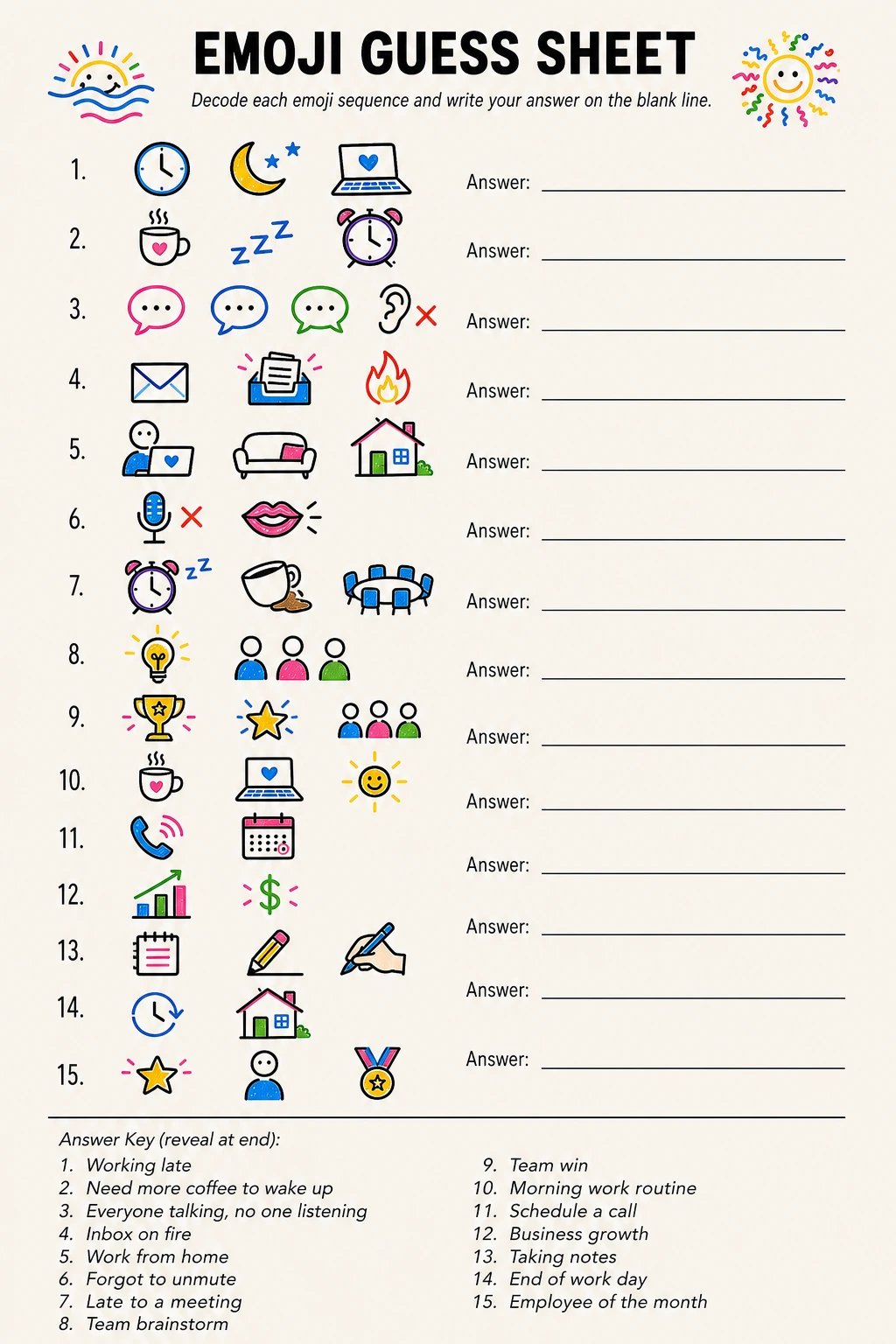
16. Emoji Guess Sheet
The Emoji Guess Sheet is a printable puzzle game where each clue is a sequence of small illustrated emoji icons (drawn as picture symbols, not written as words) and players have to decode what the sequence means.
For the virtual office version, all clues are work- and office-related: a sequence of tiny picture icons representing something like ‘working late again’ or a famous business book title, a company phrase, or a workplace scenario.
Players work through the sheet individually, write their guesses on the blank lines provided, and then answers are revealed together on the call for a group score-off.
The printable sheet contains 15 emoji sequences numbered 1–15, each displayed as a row of small illustrated picture icons followed by a blank underlined write-in line for the player’s guess.
The icons are drawn as simple, clear symbol illustrations — a tiny clock, a coffee cup, a laptop, a chart, a speech bubble — and arranged in sequences of 3–5 icons per clue.
Clue themes include work-life scenarios, office supplies, meeting room moments, and well-known workplace phrases. The answer key appears in tiny light-grey italic text at the very bottom of the sheet, numbered 1–15 to match every clue, for the host to reveal at the end.
This game is one of the best virtual office party games for mixed groups because it rewards creative lateral thinking rather than trivia knowledge — someone who started last week has exactly the same shot as the CEO, which is a genuinely wonderful equalizer.
It also plays completely silently during the solving phase, which means introverts can shine, and the reveal phase (where everyone shares their funniest wrong answers) is where the laughs happen.
Give players four minutes to complete the full sheet, then go through answers together on the call and award a point for each correct guess.
First to 10 correct answers across the group is crowned Emoji Decoder Champion, a title that absolutely deserves to go on a LinkedIn headline.
Silent solving phase means introverts shine — then the reveal of wrong answers is where everyone loses it together.
17. Two Truths and a Lie Sheet
This is the printable companion to the Two Truths and a Lie game covered earlier in this list, and it solves the biggest logistical headache of the live version: nobody wants to sit on a video call thinking of their statements from scratch while twenty people watch.
The Two Truths and a Lie Sheet is a personal prep card that each player fills in before the party and keeps beside their keyboard.
It gives them time to think of actually good, clever statements — the kind that fool 80% of the room — rather than the panicked, obviously-fake ones people improvise on the spot.
Each printable sheet has space for one player to write their three statements (two truths, one lie), with clear numbered blank lines labeled ‘Statement 1 ________,’ ‘Statement 2 ________,’ and ‘Statement 3 ________ (this is the lie ✗)’ — the lie designation is on a fold-over flap or a discreet small box the player marks privately.
Below that, the sheet has a ‘Listener Grid’ where players can write their teammates’ names and guess which statement is the lie for each person as the game progresses, turning it into a mini scorecard.
After the reveal for each person, they tick the ‘got it’ column.
The prep card format is genuinely transformative for this game.
When people have time to craft their statements, the lies become deliciously believable — ‘I once presented to 500 people with spinach in my teeth for the full 20 minutes’ is just specific enough to be either horrifyingly true or brilliantly fabricated — and the debates that follow are so much richer.
Send the PDF as part of your party invite so players can fill it in at their own pace ahead of time. Then print, hold up to camera for your statements reveal, and enjoy the chaos.
And if all this party planning has you feeling a bit frazzled, here’s your reminder that a calming evening drink after the party is basically mandatory.
Send the sheet in the calendar invite so players prep their statements before the call — better prep equals much funnier lies.

18. Team Score Sheet
Every great virtual party night needs a scorekeeper, and every great scorekeeper needs a sheet that doesn’t fall apart halfway through the third game.
The Team Score Sheet is a master tally printable designed to track points across up to six teams through up to eight game rounds — which is enough to cover an entire evening’s worth of virtual office party games from this very list.
The host prints one copy, keeps it on their desk during the call, and screen-shares it as a running leaderboard between games so everyone knows exactly where they stand.
(Turns out a visible leaderboard adds approximately 400% more competitive energy to any game, which is extremely fun.)
The sheet is formatted as a clean grid: team names run across the top row (six columns, each with a blank header line for the host to write in before the party), game names run down the left column (eight rows, each with a blank label for whichever games you’re playing), and the intersecting cells are blank score boxes.
At the bottom, a totals row adds up all columns, and a bold ‘WINNER’ banner row sits at the very bottom for the final crown.
There’s also a small sidebar column for ‘Bonus Points’ — for moments like ‘best costume,’ ‘funniest wrong answer,’ or ‘most enthusiastic BINGO shout’ — which gives the host creative latitude to keep scores tight and exciting all the way to the end.
What makes a physical scoresheet better than a digital spreadsheet for this purpose is its visibility: when the host holds it up to the camera or screen-shares a clean image of it, the whole team can see it instantly, and the low-tech simplicity of pen marks on paper feels festive rather than administrative.
Update it in real time between games, screen-share after each round for maximum drama, and save the final filled-in version as a screenshot for the team channel afterward — it becomes a fun party artifact that people will reference for weeks.
‘Team Chaos won by two points’ is the kind of lore that bonds a remote team for years.
Screen-share the score sheet after every game round — visible standings make everyone play harder and keep energy high all night.

🛍 Shopping guide
19. Win of the Week Share
Not every moment of a virtual party needs to be a competition, and Win of the Week Share is proof of that.
It’s a low-key, high-warmth go-round where each person takes 60–90 seconds to share one win from the past week — personal or professional, big or small. Someone got positive feedback on a project. Someone finally fixed the recurring bug that’s haunted them for months.
Someone’s kid lost their first tooth and they are counting it as a personal W. No judgment on the size of the win — the whole point is to pause, acknowledge progress, and hear each other genuinely for a moment.
There’s no setup required beyond the host kicking it off with their own win first (this immediately sets the tone and gives everyone a permission slip to share something real).
Go around in video-grid order and keep a gentle timer — 60 seconds is enough for a genuine share without becoming a debrief.
The host can optionally use the Icebreaker Question Cards printable as a backup if the group is shy (‘What is one thing you are better at now than a year ago?’
works perfectly here), but most of the time all you need is the invitation to share and people open up beautifully.
This moment lands especially well at the end of the party, after all the high-energy games have run, because it brings the energy down warmly rather than ending abruptly on a scoreboard result.
Remote teams rarely get unstructured moments to celebrate each other’s individual progress, and this creates one intentionally. It also has a surprisingly contagious effect: hearing a coworker share a small win has a way of reminding you of your own wins you’d forgotten to acknowledge.
It’s the kind of thing that costs nothing to run and sticks with people for days afterward. Genuinely no supplies needed, just a good host and a few minutes of real connection.
- End of party wind-down
- Teams going through a high-stress period
- Monthly team hangouts — makes it a standing ritual
20. Gratitude Round
The Gratitude Round is the perfect closing note for any virtual office party — the moment where the energy goes from competitive and silly to genuinely warm, and you realize you actually really like these people you spend 40 hours a week with (or at least most of them).
The host opens a round of shout-outs: each person publicly names one coworker and says one specific thing they’re grateful for about them — something they did, something they said, a way they showed up.
The specificity is what makes it land, so the host should nudge people away from ‘I’m grateful for the whole team’ and toward ‘I’m grateful that Priya stayed late to help me debug that dashboard.’
To run it smoothly, the host kicks off with their own gratitude first (again, model the behavior you want), and then opens it to the room in a relaxed, non-mandatory way — people can pass if they genuinely have nothing, but in practice almost everyone wants to participate once they hear the first one or two.
Keep it moving at a warm pace, thank each person after their share, and if you have a large team, give people the option to type their gratitude into the chat so the introverts can participate without speaking.
Reading the chat messages aloud is a lovely touch.
The reason this one matters for remote teams specifically is that positive feedback and appreciation often get lost in the digital shuffle — it goes unsaid because there’s no watercooler moment to say it in, no hallway conversation, no end-of-day chat by the lift.
The Gratitude Round creates that space deliberately, and it sends people back to their regular lives with a full tank. It’s not cheesy — or if it is a little cheesy, that’s the good kind of cheesy, the kind that makes people feel seen.
Close the call on this note, and your team will remember the party fondly for a long time. That, and the moment someone held up a bingo card and yelled at full volume into their webcam. Both equally important, honestly.
Model the behavior first — share your own specific gratitude before opening it to the room, and watch everyone follow your lead naturally.
Frequently Asked Questions
What are the best virtual office party games for large teams?
For large teams (20+ people), the best virtual office party games are ones that run simultaneously rather than one at a time.
Virtual Bingo (Hold Up to Camera), the This or That Chat Sheet, and Categories Speed Round all work brilliantly because everyone plays at once — nobody is sitting around waiting for their turn. Trivia with breakout-room team rounds also scales beautifully to large groups.
Avoid games that require one person to perform while everyone watches (like charades) for groups over 15, as attention drops fast.
Do players need to download any apps to play these virtual office party games?
Nope — every game on this list is designed to work with whatever video call platform your team already uses (Zoom, Teams, Google Meet, etc.) and the built-in chat feature. Printable games just need a printer and a PDF download before the call.
The only tech required for screen-share games is the ability to share your screen, which every major platform supports. No new accounts, no paid tools, nothing to install.
How long should a virtual office party last?
The sweet spot for virtual office parties is 60–90 minutes. Shorter than that and it feels rushed; longer than that and screen fatigue sets in, even if everyone is having fun.
A good structure: 10 minutes of arriving and a warm-up icebreaker, 40–50 minutes of 3–4 main games, 10–15 minutes of a quieter closing round like Win of the Week or the Gratitude Round.
If you’re running back-to-back games from this list, mix active, printable, and quiet types to keep energy varied.
How do printable games work over a video call?
Email the PDF to your team ahead of the party (ideally 24–48 hours before) so everyone can print at home.
During the call, players use their printed sheets to play along — marking bingo cards with a pen, circling answers on Would You Rather cards, writing guesses on the Guess the Coworker Sheet.
When it’s time to reveal answers or show a bingo, players hold their printed sheet up to their camera. It’s a surprisingly satisfying and very visual mechanic that makes the game feel more like a real shared experience.
What if some team members don’t want to participate in virtual party games?
Make games optional and low-stakes, and always include quieter formats alongside the active ones. The Chat Sheet games (This or That, Categories Speed Round) let quieter people participate via typing without speaking on camera, which is a huge relief for many introverts.
The Win of the Week Share and Gratitude Round give people a natural, low-pressure way to be involved without competing. Framing the whole party as a hangout rather than mandatory fun also helps — people opt in much more readily when they don’t feel obligated.
How do I keep virtual party games from feeling awkward?
The host sets the tone entirely, so start with your own energy up and model participation first — share your own icebreaker answer, your own bingo card, your own win of the week.
Keep rounds short (nobody needs to spend 10 minutes on a single question), have the next game ready before the current one ends so there are no dead-air gaps, and use the chat box as a social tool throughout rather than just for answers.
A visible Team Score Sheet also helps enormously — leaderboards create friendly investment that carries people through any awkward moments.
📌 Save These for Later
Loved these? Pin your favorite image below so you can find this list again when you’re planning.


21st birthday activities that get strangers talking fast: 9 free printables plus 5 no-prep games, al

140 clean truth or dare questions for teenagers sorted by round. Every prompt is safe, silly and doa

Bold never have i ever questions juicy and spicy with friends, 72 prompts across 6 escalating rounds
Leave a Reply